Start here
BotSquad HQ is your private workspace for assigning work and checking what the team recorded. An AI employee is a persistent, named team member with a responsibility. Atlas coordinates ordinary tasks; other employees may receive related assignments.
Start with the current navigation and the first-task exercise. The later investigation sections explain Trade’s portfolio, schedules, work sessions, usage and publication. The public Trade site shows an approved selection of records; private HQ is the place to inspect their operational context.
Current instructions: HQ UX-01. The five current interface captures use a disposable backend, isolated authored sample records and fake-runtime responses. They demonstrate controls and recorded states, not genuine employee work or live investment outcomes. The retained October 15 incident and seven older captures are explicitly historical.
This is a companion to How BotSquad Trade works. Use the operator’s existing private connection instructions to open HQ. This public guide does not provide a private access endpoint.
Open HQ and learn its navigation
Use the private access method configured by the operator. In this installation, HQ is reached through an authenticated SSH tunnel. Check that connection and the HQ service if the browser cannot connect. A connection failure alone does not establish an investment pause.
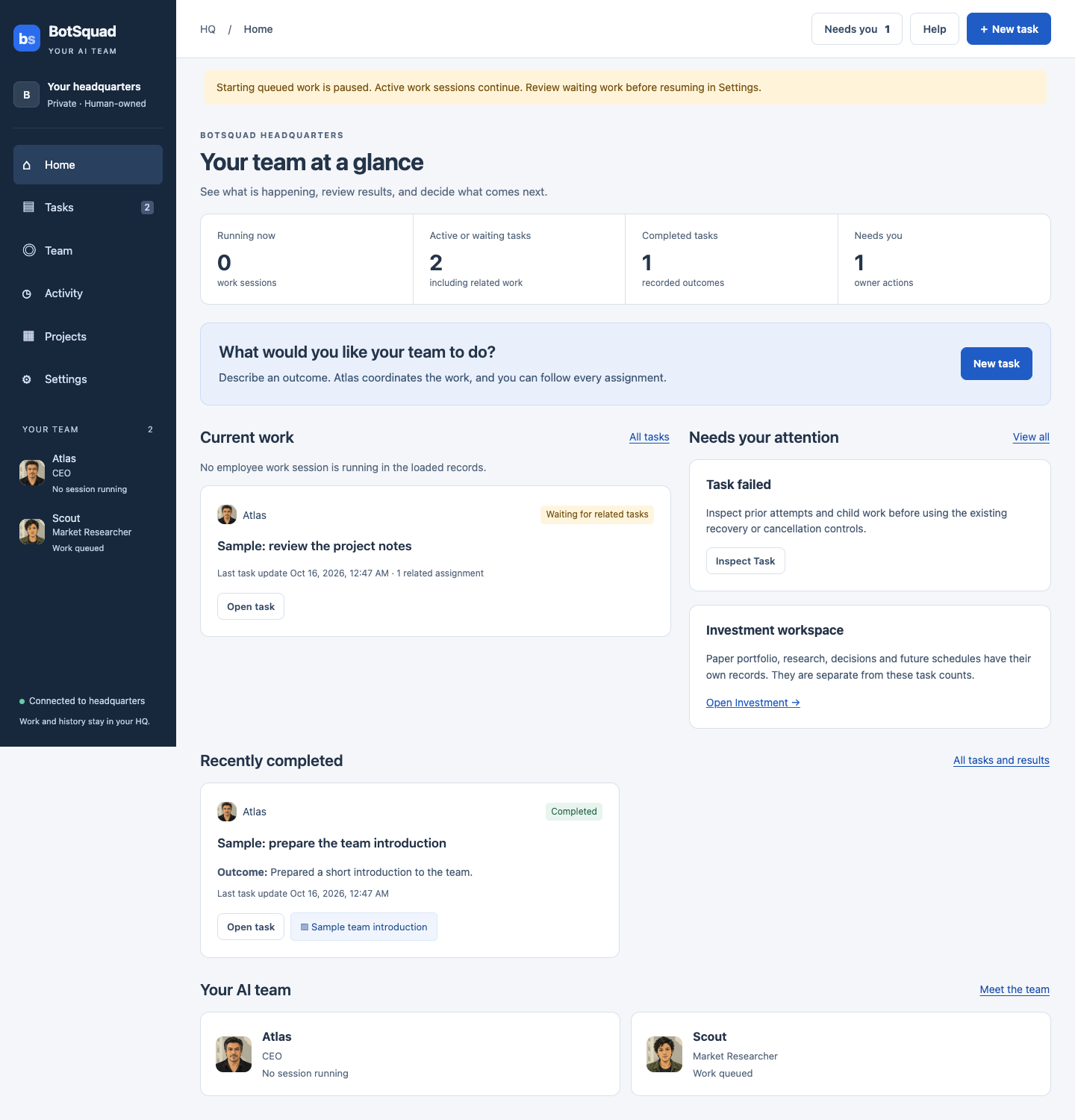
Current HQ Home. These counts and tasks are isolated authored sample data, produced with a fake runtime; they do not describe live employees or investment results.
Actual HQ interface · isolated authored sample data · Captured · Full-size screenshot
Scroll sideways for more columns.
| Destination | Related views and purpose |
|---|---|
| Home | Current work, owner attention, completed tasks and the AI team |
| Tasks | All tasks · Needs your attention · Browser work |
| Team | Employees · Conversations · Discussions |
| Activity | Recent activity · Team updates · Work sessions · Advanced audit |
| Projects | Software projects · Ongoing goals · Investment |
| Settings | Overview · Approvals · Infrastructure · Devices |
On a phone, the six main destinations appear above the page. Needs you in the header opens owner attention. New task opens the ordinary assignment form. The connection indicator and loading banner distinguish current records from a disconnected or stale view; Retry loading refreshes that view.
Scroll sideways for more columns.
| Former label | Current location |
|---|---|
| Executive channel | Activity → Team updates retains shared messages and the original composer. Use New task for an ordinary assignment. |
| Attention | Tasks → Needs your attention, or Needs you in the header |
| Working Groups | Team → Discussions |
| Executions | Activity → Work sessions |
| Audit history | Activity → Advanced audit |
| Investment run / team / publication | Projects → Investment, then Portfolio & work / Team permissions / Publication |
The three existing private Investment routes remain /investment-run, /investment-team and /investment-publication. The Investment navigation also returns to Home and Projects. Other research and legacy setup tools is an advanced disclosure on the Investment page. Opening an inspection view does not grant permission to operate its controls.
Your first task with BotSquad
1. Describe a small result
Choose New task. In What would you like done?, paste this supplied-text exercise:
Read this text and summarize it in three plain-English bullet points: “BotSquad keeps tasks, messages and results. Atlas coordinates assignments. The owner reviews outcomes and controls permissions.” Use only the text in this request. Do not browse, change software or publish anything.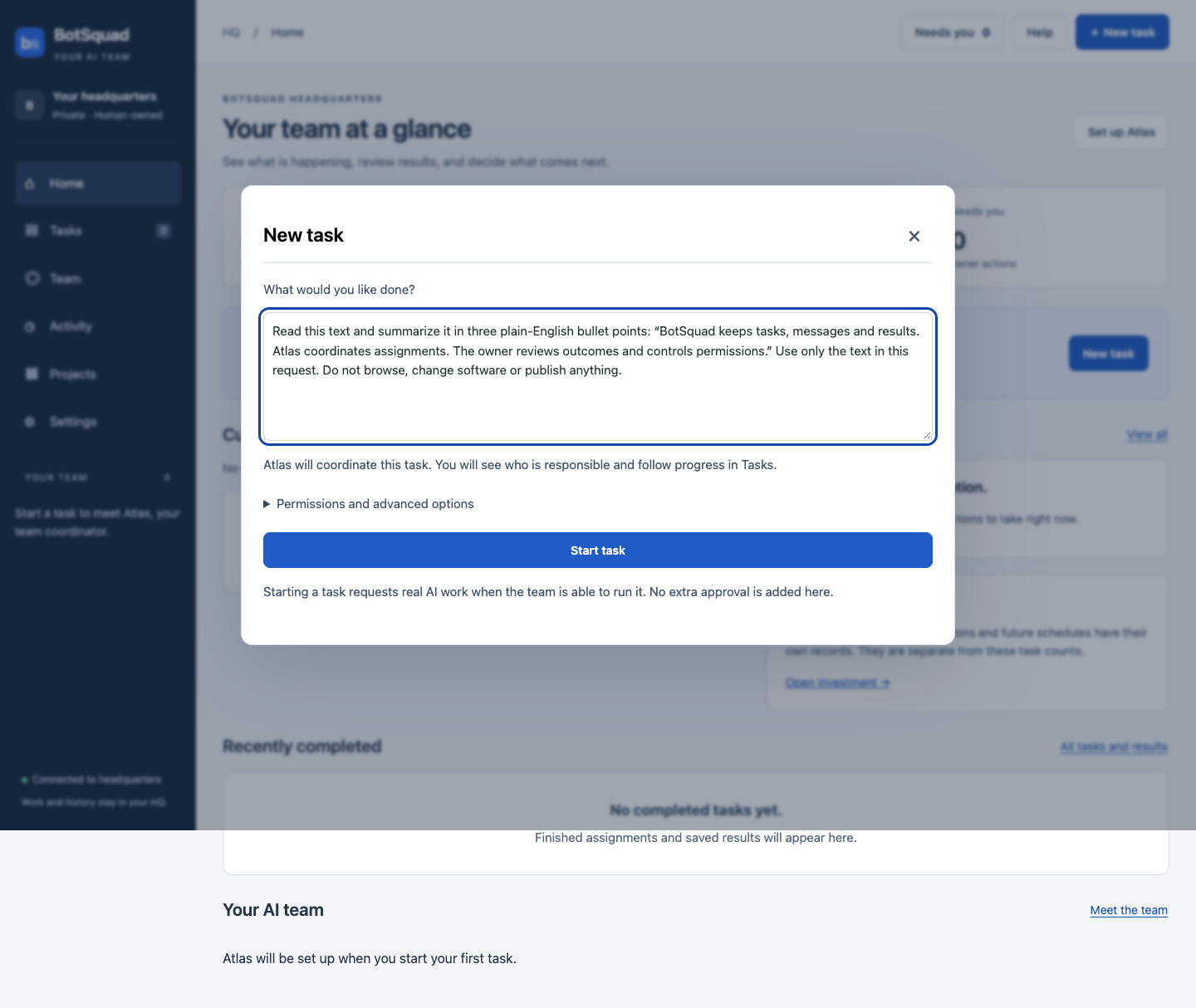
New task with the tutorial request. This is an actual HQ interface capture from an isolated sample backend; starting a task in your own HQ requests real AI work under existing limits.
Actual HQ interface · isolated authored sample data · Captured · Full-size screenshot
Choose Start task once. This requests real AI work under the installation’s existing limits and account availability. No web research, software access or publication is needed for the exercise. A task’s text cannot grant extra authority. If the team is paused, a task can remain queued; review all waiting work before using Settings → Resume queued work, which affects the team.
2. Follow the task and its employee
Open Tasks → All tasks, find your description and choose Open task. Read What you asked for, the responsible employee, What happens next or What needs checking, Results and files and Recorded progress. Related assignments shows any parent or child work. Atlas may do the task or delegate; do not assume a particular sequence.
Scroll sideways for more columns.
| Status | What to do |
|---|---|
| Waiting to start | Check the pause banner and existing eligibility; the task is queued. |
| In progress | Follow recorded activity. A work session is one employee attempt, rather than the entire task. |
| Waiting for related tasks | Read the related assignments; avoid submitting another copy. |
| Waiting for approval | Open Needs you and inspect the exact request and scope. |
| Could not finish / Waiting · review reason | Read the reason, previous attempts and any saved results before retrying. |
| Completed | Read and evaluate the recorded outcome and any saved file. |
Choose the employee’s name, or Team → Employees → Open profile, to see responsibilities and recorded work. No session running does not promise eligibility for a new task. AI settings and Permissions & research are separate controls; opening a profile does not change them.
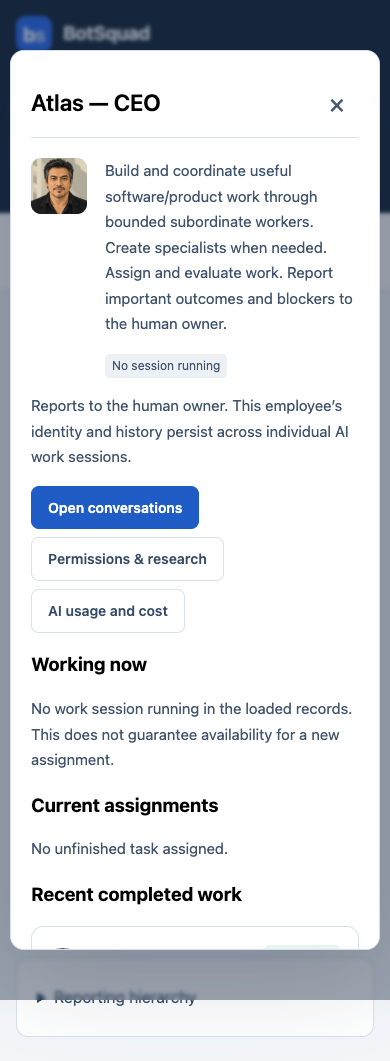
Employee profile on a phone. This actual HQ capture uses isolated sample records; No session running does not establish eligibility for a new assignment.
Actual HQ interface · isolated authored sample data · Captured · Full-size screenshot
3. Find and check the answer
When the original task is Completed, open Results and files and read its Recorded outcome. If a file was saved, select its title. A separate file is optional; related assignments may hold their own results. Finish this exercise only after you can read three sensible points grounded in the supplied text.
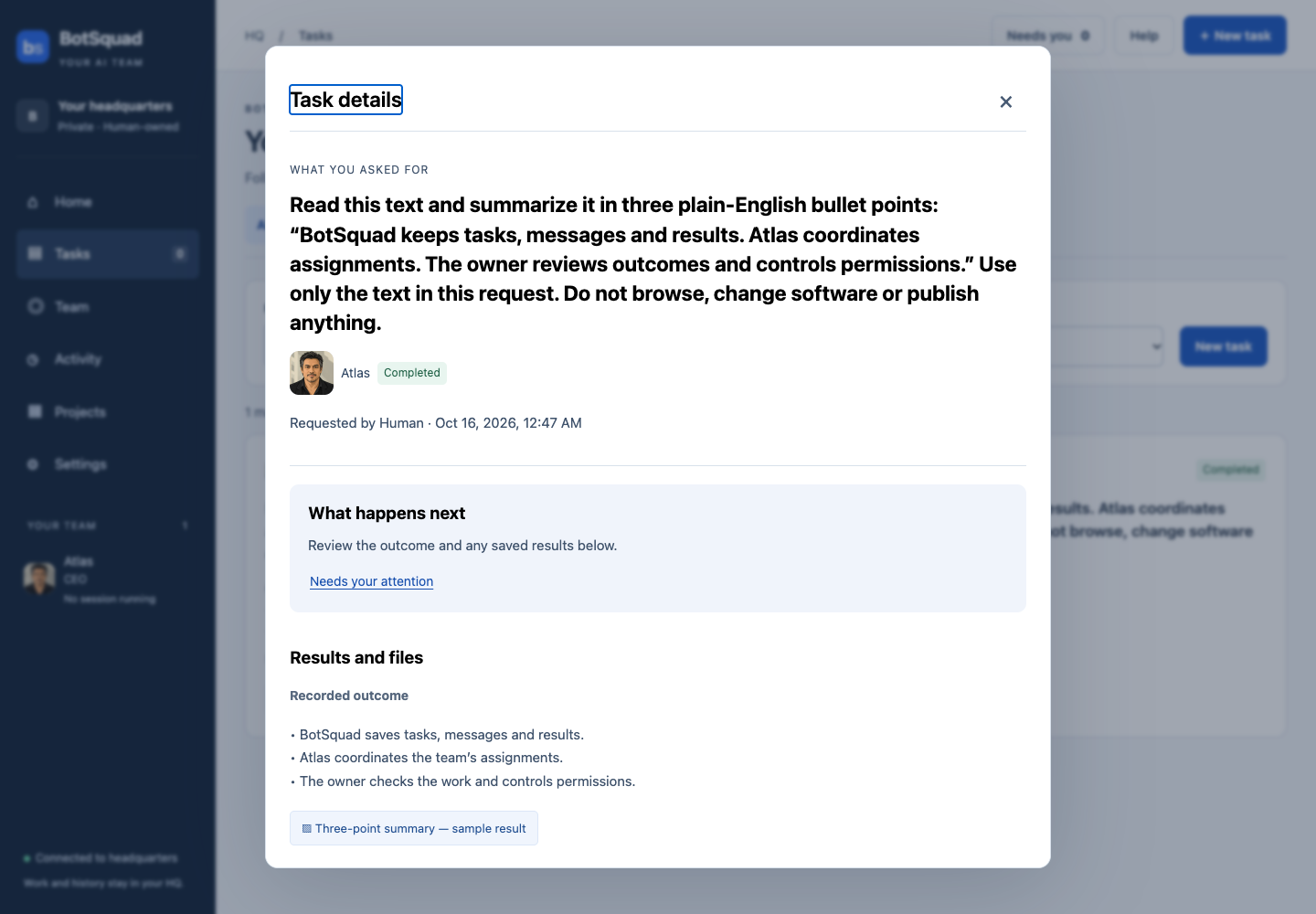
Open task shows a recorded outcome and a saved result. The fake-runtime answer was authored for repeatable testing; it is not evidence of genuine employee execution.
Actual HQ interface · isolated authored sample data · Captured · Full-size screenshot
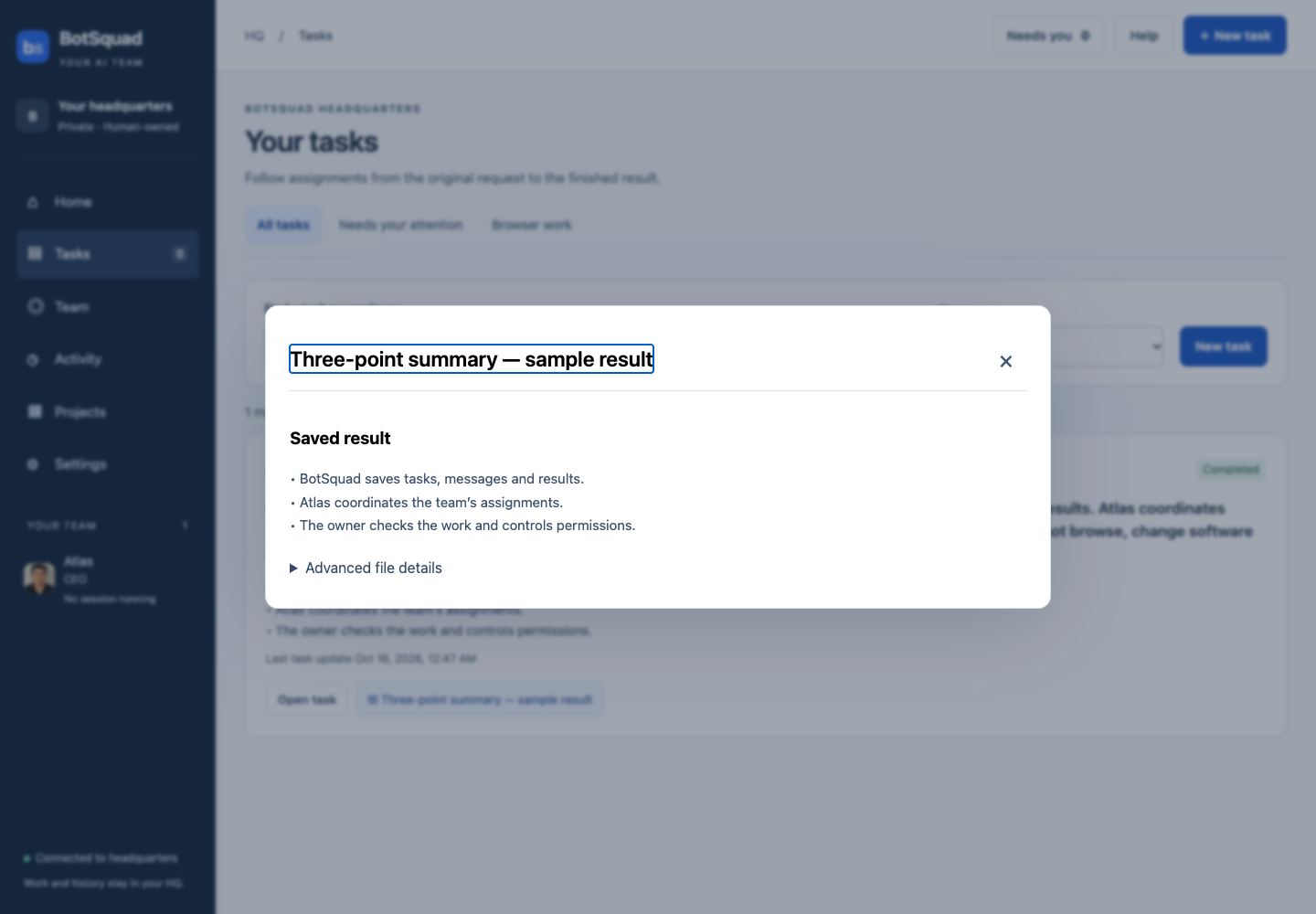
The saved sample summary. Actual HQ interface with isolated authored data and a fake-runtime response; evaluate your own task’s answer before accepting it.
Actual HQ interface · isolated authored sample data · Captured · Full-size screenshot
4. Use the next view when you need it
Team → Conversations opens employee conversations. Send passive message saves context; Send & request reply requests bounded AI work. Team → Discussions contains working groups. Activity → Recent activity shows milestones, Work sessions shows individual attempts and usage, and Advanced audit retains the loaded original events. Task Advanced details exposes original records for troubleshooting.
If creation confirmation is lost, use Check Tasks before trying again. If the form says Task created but loading failed, use Open Tasks or Retry loading to find the existing task. If work needs approval or failed, inspect the reason and prior results. Retry inspected task appears only where the existing policy permits it and requires acknowledging that review.
The maintained Your First Task with BotSquad tutorial has the same exercise and private connection instructions. The validation uses structured review and isolated browser tests; it does not claim testing with nontechnical participants or genuine provider work.
Historical Trade investigation: October 15
Historical case, before UX-01. The following incident values and seven older screenshots were observed October 15, 2026, approximately 11:30–11:45 a.m. Vancouver / 18:30–18:45 UTC. They retain the original interface and are not a statement of current balances, usage, authority or operating state. Navigation instructions use the current locations above; older labels remain visible in the historical images and pinned source.
In that observation, research produced a HOLD proposal, the independent review failed, usage evidence was incomplete and the loop was held. The portfolio was all cash while publication could still deliver lifecycle heartbeats. The case explains how those separate records can coexist. No restart, approval, model call or recovery action was performed to capture the historical guide.
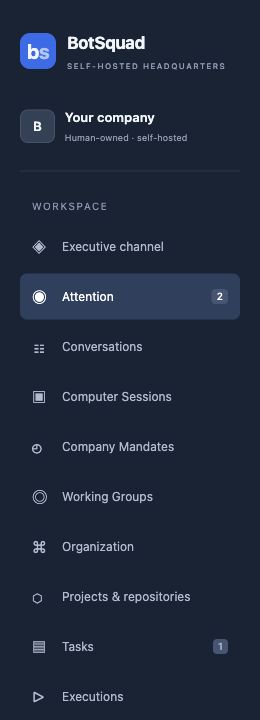
Historical capture · October 15, 2026, before UX-01. Figure 1. The upper HQ sidebar. Scroll the sidebar to reach Investment run, Investment team, Investment publication and Audit history. Counts are company-wide; they are not all Trade activity.
Historical private HQ interface — October 15, 2026 · Captured · Full-size screenshot
Start with the right question
“Is it running?” is too broad for a system with several durable workflows. Break it into questions that have separate evidence:
Scroll sideways for more columns.
| Question | First place to inspect | Evidence you need |
|---|---|---|
| Can the browser reach HQ? | Connection indicator on the home page | A current connected view, then a successful refresh |
| Does anything require owner attention? | Tasks → Needs your attention (or Needs you in the header) | The specific item and its linked workflow |
| What does the portfolio own? | Projects → Investment → Portfolio & work | Cash, holdings, orders and the latest valuation timestamp |
| What stage should run next? | The matching loop card and its schedule disclosure | Occurrence identity, due time, expiry, state and reason |
| Did a worker actually execute? | Activity → Work sessions; the loop’s AI usage table | An attributable execution, timestamps and terminal outcome |
| What did the team use and conclude? | Team → Discussions | Shared evidence, contributions, synthesis and review records |
| Was a paper decision accepted? | Loop evidence / portfolio history | Matching proposal, independent review and submission |
| Did the website receive it? | Projects → Investment → Publication | A delivered batch receipt for the relevant records |
A healthy HTTP service establishes reachability. It does not establish that the scheduler has eligible work, that a model finished, that a proposal passed review, or that the website received a new financial record. Investigate one assertion at a time.
The server owns the scheduler and durable state. Your browser is a client. Closing a tab does not stop the daily loop, and reopening one does not replay a missed session. Idle employees do not continuously invoke a model. Reading existing screens does not ask Atlas or Maya to reason again. Architecture
Identify the portfolio, scope and loop before comparing numbers
Open Projects → Investment → Portfolio & work. The top portfolio panel and the loop cards below it answer different questions. A persistent portfolio can be used by an original operating scope and a later recovery scope. Both can remain visible after one stops.
At the historical checkpoint the page did not have a dedicated “select current run” control. Its Approved team dropdown belongs to schedule creation; changing that dropdown does not filter the historical cards. Match the records you are inspecting, rather than assuming the first card or a familiar session date must be the correct one.
Expand Schedule, reservations, measured usage and receipts on the relevant card when you need exact identity. In your private incident notes, record:
Scroll sideways for more columns.
| Field | Meaning |
|---|---|
loop_id | The particular scheduled operating loop |
scope_id | The permissions and working-group context used by that loop |
owner.team.runId | The persistent portfolio to which the scope belongs |
activity.finite.authorityId | The independent finite operating allowance |
generation and plan_revision | The control generation and schedule revision used to reject stale work |
state and reason | The loop's present state and its recorded explanation |
Keep those identifiers private. They are useful join keys for an operator, not necessary public documentation. The public site's run identifier can be a different projection identifier; do not assume it is the private portfolio's database key.
At the checkpoint there is a blocked successor and a stopped predecessor, both associated with October 14–15 and the same portfolio. Their existence does not mean that two independent portfolios were funded or that usage should be added twice. The predecessor is retained evidence of what happened before recovery. Loop inspection and controls
Read the portfolio before reading the discussion
Start with economic state: lifecycle, cash, holdings, pending orders and the latest valuation. This establishes whether a failure changed the book or only interrupted a proposed decision.
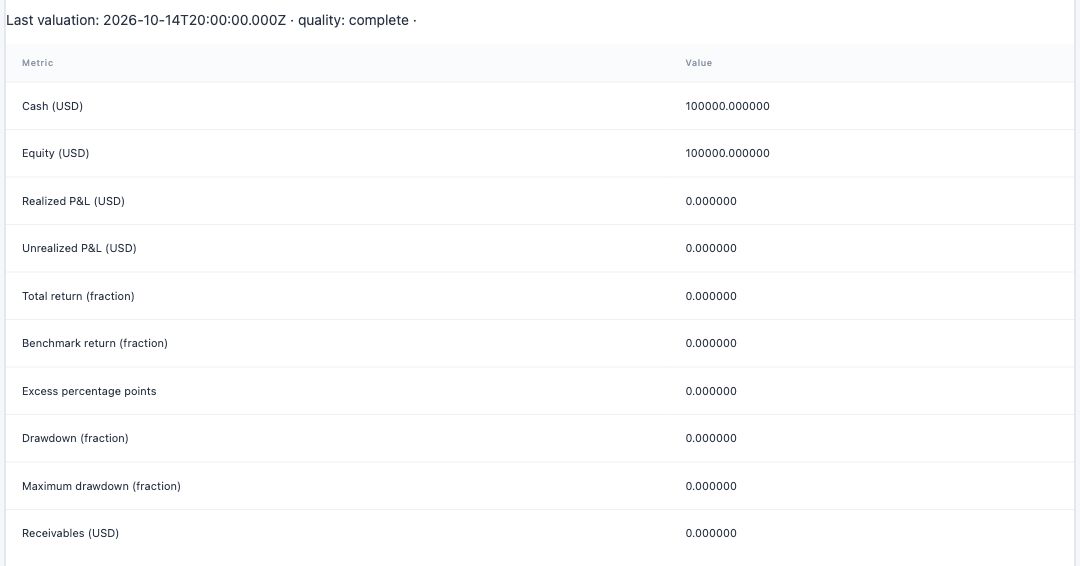
Historical capture · October 15, 2026, before UX-01. Figure 2. The latest valuation is October 14 at 20:00 UTC. The displayed cash and equity are USD 100,000. A freshly opened page does not make that valuation current to October 15.
Historical private HQ interface — October 15, 2026 · Captured · Full-size screenshot
Read the timestamp and quality before interpreting the numbers. A complete valuation means complete under the recorded valuation rules for that snapshot. It does not promise that newer market observations have arrived. Likewise, zero realized P&L, zero drawdown and no holdings describe this portfolio history; they do not prove a successful autonomous trading day.
For a flat portfolio, inspect whether the system recorded an accepted HOLD or whether work stopped before submission. Both can leave cash unchanged, but they are different experimental outcomes. Here there is a proposal but no committed review or submission. “The team successfully chose to hold” would overstate the evidence.
The portfolio panel also shows trading metrics, holdings, sector exposure and valuation rows. Read return fractions and excess-return percentage points according to their labels; do not silently format both as the same unit. The benchmark has its own accounting path. A benchmark allocation does not mean the strategy portfolio bought a stock.
The Original decisions, source evidence, cash flows and immutable ledger disclosure exposes reconstructed portfolio evidence. Treat it as an inspection view, not a promise that every raw database journal row or every historical source record is printed there. Some displayed collections are bounded. Use the retained database and journal for an exhaustive audit.
A refresh limitation in the historical capture matters: the Refresh button at the top of the investment page reloads the loop cards. The portfolio panel is loaded independently. For a coherent fresh observation of both, reload the whole browser page and note the time. Portfolio interface
Interpret a loop card as several independent checks
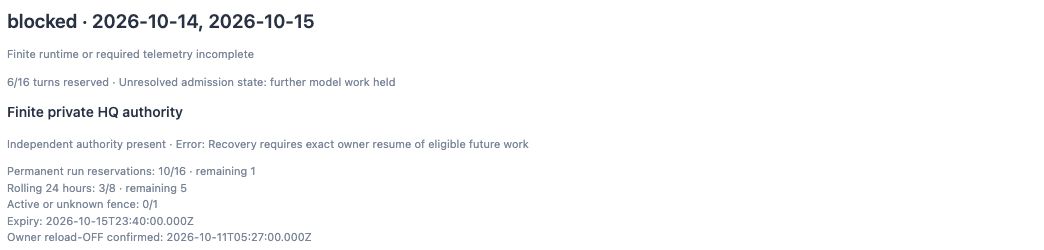
Historical capture · October 15, 2026, before UX-01. Figure 3. The loop is blocked even though an independent authority is present. Each counter covers a different scope. The “remaining 1” value reflects the stricter recovery allowance.
Historical private HQ interface — October 15, 2026 · Captured · Full-size screenshot
The card combines scheduling, approval, provider-call reservations and usage health. Read the reason text and each layer separately:
Scroll sideways for more columns.
| Display at the checkpoint | Correct interpretation |
|---|---|
| blocked | This loop cannot continue ordinary scheduled work in its current state |
| 6/16 turns reserved | Six turns belong to the successor loop; four original turns are outside this local count |
| Independent authority: present | A retained approval matches the inspected configuration; dispatch can still fail other checks |
| 10/16 permanent; remaining 1 | Ten calls are consumed across the retained original/recovery family; a stricter recovery ceiling applies |
| rolling 24h: 3/8; remaining 5 | A separate recent-call limit; it does not refund permanent calls or repair telemetry |
| active/unknown: 0/1 | No currently counted active or unresolved provider reservation; settled but incomplete usage can still block |
| expiry | The absolute end of this authority, independent of whether useful work was completed |
| Reload-OFF attestation | A recorded owner attestation about the funding configuration, not a generic acknowledgment button |
The permanent denominator is particularly easy to misread. The original policy displays a maximum of 16, but this recovery permits at most seven additional calls after four original calls. The effective ceiling is min(16, 4 + 7) = 11. With ten consumed calls, only one remains. Subtracting 10 from the displayed 16 gives the wrong answer.
The historical block mentions incomplete finite-HQ telemetry and exact owner resume. That wording does not promise that clicking Resume will pass. Resume must still satisfy all underlying checks, including usage and eligible future work. A free slot is not sufficient authority to replay old work.
Also distinguish the page's generic included-only subscription warning from the actual finite mode. The inspected scope uses credit_approved_finite_hq; the generic warning describes a different execution mode. Inspect the selected scope's policy rather than treating every banner as a new diagnosis of this loop. Finite authority checks
Trace the scheduled occurrence and its clocks
Expand Schedule, reservations, measured usage and receipts. The occurrences array is the most direct answer to “what was supposed to happen today?” An occurrence is one stage, for one session, in one plan. It is not a worker and not necessarily a model call.
Scroll sideways for more columns.
| Occurrence field | What to check |
|---|---|
occurrence_id, session, stage | Which exact scheduled event you are examining |
due_at, expires_at | The allowed time window in UTC |
state, reason | Pending, running, complete, blocked, missed or cancelled, and why |
attempts, retry_at | Recorded attempts and any bounded retry timing |
result | Stage-specific result; some results are encoded as a JSON string |
generation, plan_revision | Whether this event belongs to the current control generation and plan |
Walk through the session chronologically: research collection → research → cutoff → close collection → delayed paper accounting → marking → expiry. In the observed-paper schedule, the internal open stage is delayed accounting at 20:20 UTC, not execution at the market opening. Consult the saved schedule for exact dates and times; do not infer them from a weekday or a browser's local clock. At this October checkpoint, Vancouver is seven hours behind UTC, so 20:00 UTC is 1:00 p.m. local time.
For a pending stage, compare its due time with the server's current time and then check all prerequisite stages. For a blocked stage, read its reason and follow the associated execution or collection evidence. For a missed stage, the window has passed; it is not a queue item waiting for a convenient retry. A cancelled stage is likewise not restored automatically by Resume.
The phrase No future eligible research session in the card means the view found no later pending research timestamp. The opposite message would not prove that every dispatch condition passes. The application still checks authority, source readiness, concurrency, usage, worker eligibility and deadlines when dispatching.
The schedule disclosure shows the inspected plan's occurrences. It is not an exhaustive list of superseded plan history. Preserve the plan revision in an incident report so two people do not accidentally compare different schedules.
Three clocks often explain a surprising pause: the market session, the occurrence's dispatch window, and the authority's absolute expiry. Provider executions add start/finish times; publication adds delivery times. A new heartbeat cannot extend a research cutoff, and a restart cannot move an expired occurrence back into its original window. Scheduler state transitions
Follow an execution and its usage evidence
The loop's AI usage section is a convenient aggregate. The Activity → Work sessions view lets you inspect runtime attempts across the company and use Usage & cost for an individual attempt. Match the working-group origin, worker and timestamp, then confirm the exact execution identifier privately.
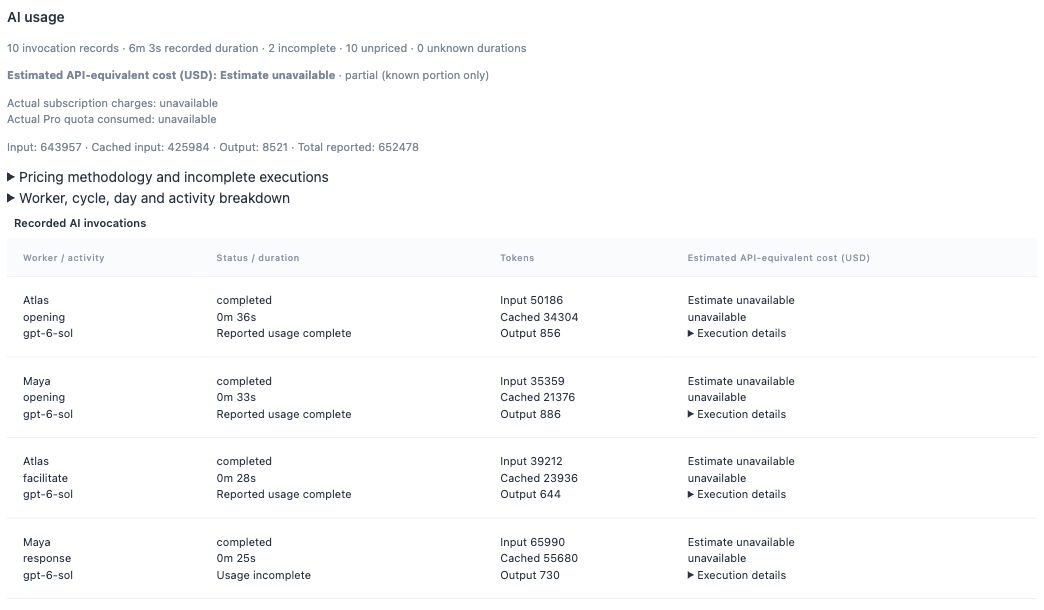
Historical capture · October 15, 2026, before UX-01. Figure 4. An excerpt of the aggregate and its first four rows. A completed runtime row can still have incomplete usage. Actual charges and subscription quota are unknown.
Historical private HQ interface — October 15, 2026 · Captured · Full-size screenshot
Do not merge these independent dimensions:
Scroll sideways for more columns.
| Dimension | Example | Meaning |
|---|---|---|
| Runtime status | completed, failed, interrupted, awaiting_approval | How the execution ended or was classified |
| Usage settlement | settled | Whether the accounting path has a terminal settlement |
| Usage completeness | complete / incomplete | Whether the required terminal evidence and categories are present |
| Price availability | priced / unpriced | Whether an exact model/rate mapping can produce the stated estimate |
| Provider reservation | reserved, admitted, transmitted, settled or unknown | The independently retained call admission and outcome evidence |
A final text response does not establish complete usage. A complete usage record does not establish a good proposal. An unpriced record does not mean zero cost. In this snapshot, all ten calls are unpriced, while two have incomplete usage; those are separate counts.
Expand Execution details to see the execution, run/cycle references, provider request/thread/turn references, model, timestamps, token categories, pricing restrictions and explanatory unknowns. This smaller disclosure does not display every accounting field. For settled, inspect aiUsage.executions in the larger schedule/receipts JSON.
Cached input is a subset of input, and reasoning tokens may be included within output. Do not add those subsets a second time to construct a total. Estimates labeled API-equivalent are not actual subscription charges. HQ does not learn the owner's remaining subscription quota merely because it has a token count. Exact model pricing must not be substituted with a similarly named model's price.
The Worker, cycle, day and activity breakdown helps locate the source of aggregate usage. The worker inspector's AI usage and cost is broader than one Trade loop. Likewise, both the predecessor and successor loop cards in the historical capture report ten invocations because their reports filter the same persistent portfolio. Do not add the two cards to claim twenty calls.
Current worker profile settings are not historical execution settings. Inspect the execution's recorded model, reasoning level and runtime provenance when explaining what actually ran. Changes to a worker profile affect future work; they do not rewrite prior execution evidence. Usage UI · Usage accounting
Examine what the team actually saw and said
Return to Private HQ → Team → Discussions. Choose the discussion matching the scope you recorded. The current and predecessor discussions can have the same topic. Confirm their identity and state rather than selecting by title alone.
Read the charter, shared audience, facilitator, synthesizer, turn/round limits and deadline first. The historical company sidebar called Atlas “CEO” and Maya “Product Manager.” Their investment scope gives them specific Trade responsibilities. Those scoped permissions are more relevant to this decision than their company-wide job titles.
Then examine the evidence in this order:
- Shared evidence packet: which selected records were made available to the discussion? Inspect shared source shows the retained material. Membership alone does not expose private employee histories.
- Attributable discussion: who contributed, in what order, and against which transcript/evidence revisions? References connect claims to prior contributions and shared material.
- Questions and responses: which explicit questions were answered, and which remain unresolved?
- Saved synthesis: what conclusion was actually retained, and was it marked incomplete?
- The relevant execution evidence: did the turn that was supposed to produce a result finish and persist the required typed record?
The historical working-group counter of six used turns out of 24 is a discussion limit. It is not interchangeable with six loop turns out of 16 or the finite family's eleven-call effective ceiling. Multiple limits constrain the same workflow at different layers; the loosest one does not override the others.
Private discussion text can help diagnose a failure, but it is not automatically approved for public publication. The public desk may show a selected derivative rather than the complete transcript. These screenshots therefore keep private contributions and expanded evidence out of view.
Avoid using Resume, Finish with current evidence, Authorize another bounded round or Request reply as inspection tools. They can authorize additional work. Even saving an owner interjection changes the shared record and can affect later authorized turns. Read the existing evidence before asking a worker to explain it again. Working-group interface
Prove a decision by following the record chain
The key diagnostic skill is joining records across layers. A prose statement such as “I recommend HOLD” is not equivalent to a submitted paper decision. A proposal is not an order, and an order is not a fill.
Scroll sideways to read the full block.
Persistent portfolio
  └─ operating scope + finite authority
       └─ loop plan / occurrence
            └─ worker execution ── provider reservation + usage
                 └─ proposal revision + proposal hash
                      └─ independent review of that exact hash
                           └─ accepted submission
                                └─ order, when the command requires one
                                     └─ fill / cash-flow / valuation evidence

Approved public projection → outbox job → receiver receipt → public page
The schedule/receipts JSON provides several useful join points:
Scroll sideways for more columns.
| Collection | Fields to compare privately |
|---|---|
aiUsage.executions | execution_id, cycle_id, worker_id, status, settled, completeness, reasons |
occurrences | Match an execution's cycle_id to occurrence_id |
activity.finite.reservations | Match executionId; inspect occurrenceId, state, status, complete, reservedAt, deadline |
owner.proposals | proposal_id, revision, execution_id, proposal_hash, command, narrative and provenance |
owner.reviews | proposal_id, execution_id, proposal_hash, disposition |
owner.submissions | proposal_id, review_id, execution_id, journal_version, result |
orders | Actual accepted orders and their current status |
An illustrative trace might be: occurrence O has execution E1; E1 produced proposal P at hash H; a different eligible worker's execution E2 produced review R of H; submission S names P and R. These letters are explanatory placeholders, not live identifiers. If the proposal changes to a new hash, an old review is not evidence that the new revision passed.
For HOLD, a valid accepted decision may create no order. For BUY or SELL, look for the accepted order and then the relevant simulated fill evidence. Reading only an order intention in the transcript skips the trusted admission step. A late or failed review cannot be inferred from a plausible synthesis.
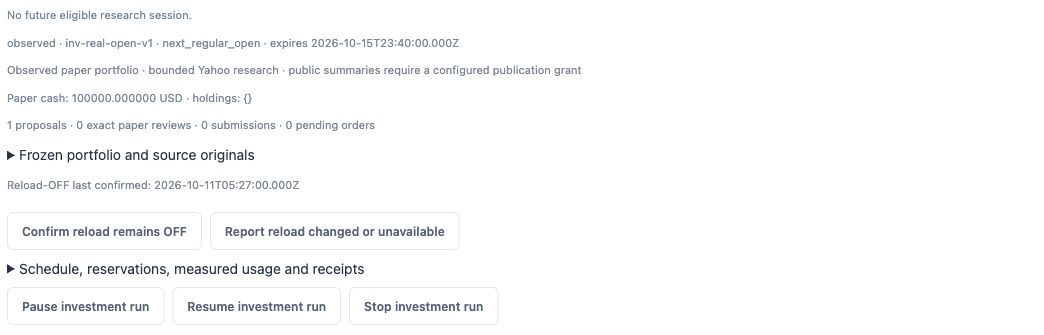
Historical capture · October 15, 2026, before UX-01. Figure 5. The counts locate the break: a proposal exists, but no independent review or submission is committed. The buttons below are controls, not diagnostic acknowledgments.
Historical private HQ interface — October 15, 2026 · Captured · Full-size screenshot
Here the evidence stops between proposal and review. That explains the unchanged portfolio without inventing a successful HOLD decision. Investment team admission
Work through the October 15 review failure
The historical example shows why a single status label is insufficient. In Activity → Work sessions, Maya's review appears as awaiting approval, with a runtime message about an unavailable approval. In the loop's usage table, the same review has incomplete usage. The company Settings → Approvals count is zero.
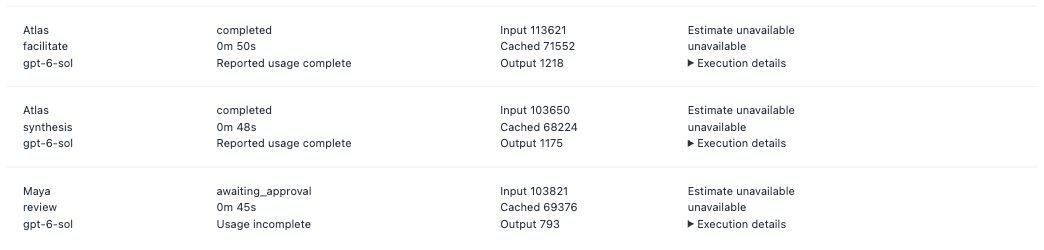
Historical capture · October 15, 2026, before UX-01. Figure 6. This is a retained historical execution label. It does not establish that an approval is waiting for the owner in the Approvals view.
Historical private HQ interface — October 15, 2026 · Captured · Full-size screenshot
An investigation should proceed as follows:
- Match the review execution to the correct occurrence and proposal context.
- Read its runtime error and usage explanation. The displayed token numbers do not by themselves establish complete terminal accounting.
- Check the committed review and submission collections. Both are empty here.
- Check Settings → Approvals for an actual actionable record. Do not manufacture an approval from the status text.
- Consult the retained tool/runtime receipt and deployed source when the UI cannot explain the failure precisely.
The prior technical investigation found a review-clock defect: the tool facade sampled reviewedAt, then the journal sampled a slightly later recordedAt within the same paper_review call. The reducer required exact equality and rejected the mismatch. Frozen test clocks had hidden it. PR #102 now samples one trusted commit timestamp after validation for both the review and journal entry, while retaining live authorization and cutoff checks. A separate adapter catch had mislabeled the bounded tool exception as awaiting approval even though no approval request existed; that classification path was also repaired. The UI alone does not prove these causes; the diagnosis required the tool receipt and source analysis. The old execution label and incomplete usage remain historical evidence.
Deploying the fix changes how a future eligible review is handled. It does not synthesize a missing review, mark an incomplete usage record complete, refund a provider call or replay an elapsed occurrence. This distinction is essential when verifying a repair: source and deployment evidence establish that the fix is installed; a later eligible execution is needed to demonstrate its live path. The complete formal decision/fill path remains unproven at this checkpoint. Review-clock repair
Inspect publication separately from execution
Open Projects → Investment → Publication from Projects or the Investment navigation. Use Refresh status to inspect the existing channel. The source/destination header identifies the channel privately; it has been excluded from the screenshot.
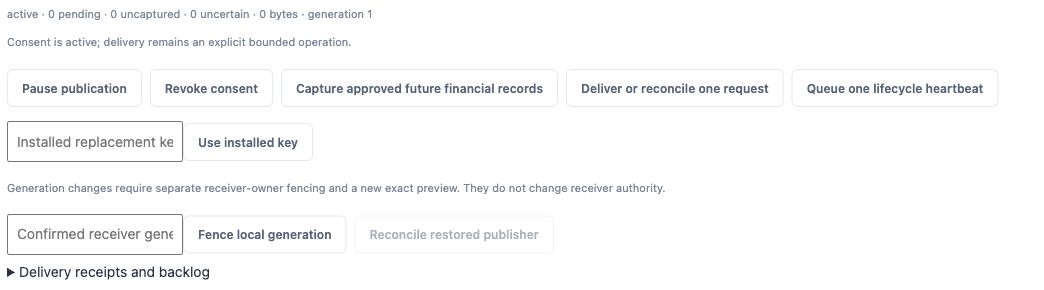
Historical capture · October 15, 2026, before UX-01. Figure 7. Publication is active with an empty backlog while the investment loop is blocked. No delivery control was activated for this capture.
Historical private HQ interface — October 15, 2026 · Captured · Full-size screenshot
Read the health fields independently:
Scroll sideways for more columns.
| Field | Diagnostic use |
|---|---|
| State and consent expiry | Whether this channel still has the relevant consent |
| Pending and bytes | Staged work waiting in the durable outbox |
| Uncaptured | Eligible source material not yet staged under the current capture rules |
| Uncertain | Requests whose remote outcome needs reconciliation before a replacement is safe |
| Oldest backlog age | Whether queued work has exceeded its attention threshold |
| Generation / restore requirement | Whether local and receiver recovery state require coordinated fencing |
| Budget/delivery/new-risk flags | Whether configured limits or retained conditions block progress |
Expand Delivery receipts and backlog privately. It shows health details and jobs with fields such as kind, state, digest, retryAt and receipt. A delivered record batch can include accepted record identifiers, a receiver cursor and a watermark. A heartbeat receipt proves acceptance of a lifecycle contact, not acceptance of a new decision or valuation.
The historical snapshot has no pending, uncaptured or uncertain jobs. That does not mean every private conversation has been published. The channel only covers approved record classes and derivatives. New explanations and artifacts can require another exact preview. “Uncaptured zero” is evaluated within that scope.
To investigate a missing public record, first establish that the private typed record exists. Then check whether it is eligible under the publication consent, whether it was captured into a job, whether that job was acknowledged, and whether the public view is displaying the corresponding run and record. A website refresh cannot create a private review that never committed.
Do not use the publicationHealth: { disabled: true } value in an observed/private-paper loop's JSON as proof that the separate public publisher is off. Inspect the publication channel itself. Also treat older generic page copy about a “synthetic source” as insufficient to classify the selected source: this channel uses the observed-paper portfolio adapter, with its own evidence mode and publication boundary.
Capture approved future financial records, Deliver or reconcile one request and Queue one lifecycle heartbeat perform operations. They are not aliases for Refresh. A restored-publisher reconciliation or generation fence needs the operator's recovery procedure and receiver evidence. Publisher interface · Publication protocol
Use a symptom-to-evidence troubleshooting path
Scroll sideways for more columns.
| Symptom | Examine next | What would be an unsupported conclusion? |
|---|---|---|
| Public site says paused | Matching HQ portfolio and loop reason; public record timestamp | “The website is causing the pause” |
| Connected HQ, no active executions | Current occurrence, future schedule, authority and dispatch state | “Connected means work should be running continuously” |
| No new discussion today | Collection occurrence, research window, group and execution origin | “The model forgot to wake itself up” |
| Completed execution, incomplete usage | Terminal settlement, completeness reasons and reservation | “Completed text means all accounting is complete” |
| Awaiting-approval label, no Approvals item | Runtime receipt, exact failed tool and historical classification | “Clicking a generic approval button will recover this review” |
| Cash unchanged after a persuasive discussion | Proposal → review → submission → order chain | “The team successfully submitted HOLD” |
| Ten invocations on two cards | Shared portfolio identifier and aggregate filter | “Twenty calls were consumed” |
| Recent publisher contact, old valuation | Heartbeat receipt versus financial-record receipt | “The portfolio was revalued when the heartbeat arrived” |
| Unpriced usage | Exact model pricing availability and restrictions | “The call was free” |
| No future eligible research session | Selected plan's pending future occurrences and absolute expiry | “Resume will restart the whole day” |
If the source-collection stage is blocked, inspect its retained result before reaching for a different feed or manually entering a price. Determine whether the problem was a request limit, source response, qualification rule, interrupted collection or an expired window. The market-data budget remains US$0 incremental, and automated access/publication permissions remain part of the source boundary. A model-generated substitute price would destroy the experiment's evidence trail. Market-data decision
If information seems inconsistent between panels, record observation times, perform one full page reload, and compare identities and scopes before changing anything. Historical cards, bounded views and separate refresh behavior explain some discrepancies. A persistent discrepancy belongs in an incident report with the exact fields, not an improvised state reset.
For a pause that needs live observation, tail the service journal and follow the selected Trade scope in separate terminals. A running service, a moving stage and a reviewed submission answer different questions. Preserve the loop's exact reason before attempting recovery.
Know which controls change state
Investigation and recovery are different phases. Most mistakes come from using an action button to find out what it does. The current interface includes controls with materially different effects:
Scroll sideways for more columns.
| Control or activity | Effect |
|---|---|
| Navigate, expand a disclosure, Refresh, full page reload, Usage & cost | Inspect existing state; no new employee reasoning is requested |
| Use portfolio for new finite authority | Prefills a local setup form; does not itself renew authority |
| Preview exact scope/schedule/portfolio or Build exact preview | Can persist a draft or exact preview; does not necessarily invoke a model or transmit data, but is not purely read-only |
| Approve/save consent or scope | Changes durable authorization/configuration |
| Start / Resume | Attempts to authorize eligible future work under current checks |
| Loop Pause / Stop | Changes loop control state and fences stale work; unfilled orders are cancelled while completed fills remain |
| Settings → Pause new work / Resume queued work | Holds company dispatch; it is a separate control from the investment loop's lifecycle |
| Group Finish / another bounded round / Request reply | Can authorize additional model work |
| Confirm Reload OFF / report funding configuration changed | Records a funding-state attestation or change; only use when factually justified |
| Capture / Deliver / Heartbeat / publication reconciliation | Changes publication state and may transmit approved data |
| Service restart or deployment | Changes process/code state; does not reset durable portfolio, call history or approval evidence |
Pause is not time travel. Wall-clock windows and authority expiry continue to matter. On resume, elapsed pending work can become missed; cancelled orders and ended cycles do not revive. A stop or generation change also prevents an old asynchronous callback from being treated as current work. An active provider call may still require settlement or reconciliation after interruption.
The existing Resume path requires an exact matching authority/digest, valid evidence and eligible future work. The historical two-gap example cannot be repaired merely by pressing the visible buttons. A new scope or recovery amendment is a separate reviewed operation with retained history, not a fresh empty counter.
There is no need to change any of these controls to collect the evidence described in this guide. The useful recovery question is precise: “Which failed condition has been repaired, what retained evidence proves that, and what future action is now authorized?” Loop controls
Escalate beyond the UI when the evidence stops
HQ is an inspection interface, not a complete debugger. Escalate when a display lacks terminal settlement detail, a collection was interrupted, a runtime classification is ambiguous, or a recovery invariant needs proof from the durable store.
The operator's next read-only checks should establish the deployed revision and service status, then examine a narrow log window around the relevant UTC timestamps. Search with the exact private execution or occurrence identifier. Preserve the original failure before changing code or restarting a process. Record both the application outcome and provider-call outcome; a lost response does not prove that no call happened.
The log-tailing commands below show how to collect that evidence without restarting HQ or asking an employee to run again.
For a database investigation, use an approved consistent backup or a read-only connection and queries appropriate to the deployed schema. Join the occurrence, execution, usage, finite reservation, proposal and review records described above. The portfolio database and independently retained finite authority are related evidence sources; inspecting only one can miss a constraint. Do not edit rows to make a status look complete, delete reservations to recover capacity, or copy an old approval onto a new proposal.
Treat SQL results, runtime logs, expanded receipts and transcripts as private diagnostic material. They can contain identifiers, provider references and content that is not in the public projection. A public incident summary should state the stage, failure class, observed effect, repair and remaining uncertainty without dumping those raw records.
A good repair verification has three distinct claims: the code change addresses the diagnosed cause; the intended revision is actually deployed; and a future eligible execution demonstrates the repaired behavior. Passing the first two does not justify claiming the third. Documentation screenshots establish what the interface displayed at capture time, not a successful end-to-end trade.
Tail logs and follow Trade activity
Tailing means keeping a terminal open to show new diagnostic output as it arrives. Use two views: the systemd journal for the HQ process, and saved Trade events for employee and stage activity. They have different sources and neither replaces the proposal, review and submission record chain.
Start with authorized SSH access
Run these commands from your own terminal. The name botsquad is an SSH alias already configured by this installation's operator, normally in ~/.ssh/config. You need the approved account, key and permission to read the relevant journal or private database. The public website does not provide that access. On another installation, use its operator-approved alias and service name. A hostname-resolution or permission error is an access problem, not evidence that Trade stopped.
Follow the service journal
Scroll sideways to read the full block.
ssh botsquad 'journalctl -u botsquad.service -f --output=short-iso'-u selects the HQ service; -f displays recent entries and keeps following new ones. --output=short-iso gives each journal entry a timestamp with its UTC offset. Press Ctrl+C to leave the viewer. This does not stop or restart botsquad.service, pause the Trade loop, or cancel an employee's model call.
To inspect a recent failure without leaving a follower running:
Scroll sideways to read the full block.
ssh botsquad 'journalctl -u botsquad.service --since "15 minutes ago" --no-pager --output=short-iso'The time filter is evaluated on the server. --no-pager prints the matching history and exits. An empty result means no retained entries matched that window. In this installation, StandardOutput=journal and StandardError=inherit route the service's output into the system journal. In practice, this view is most useful for startup, shutdown and runtime errors. It is not a transcript of every Atlas or Maya action.
Follow the October 15 renewal's Trade activity
Employee runtime events are append-only SQLite audit records, not a plain-text log file that can be watched with tail -f. For the October 15, 2026 owner-authorized renewal, the operator installed this small read-only follower:
Scroll sideways to read the full block.
ssh botsquad 'python3 -u /var/tmp/botsquad-owner-renewal-20261015/tail-trade.py'Incident-specific operator helper. This dated path is not a permanent BotSquad product command. It follows only the renewal scope selected by that incident's retained configuration. It may be absent on another host or after a later deployment. A missing file does not mean the service is down; use HQ's current inspection views and ask the operator for the appropriate supported diagnostic tool.
The helper opens SQLite in read-only mode and polls every two seconds. It begins with a bounded window of matching recent events, then prints new Atlas/Maya event types and their execution IDs, plus changes in loop/stage state and reasons, execution-status counts, and proposal/review/submission counts. It does not print the full discussion, invoke a model, write database rows or grant authority. python3 -u makes output appear promptly instead of waiting in an output buffer.
For one current state snapshot, with any matching recent events, add --once:
Scroll sideways to read the full block.
ssh botsquad 'python3 -u /var/tmp/botsquad-owner-renewal-20261015/tail-trade.py --once'Press Ctrl+C to leave the continuous viewer. The follower prints state only when it changes, so silence is not a heartbeat failure. Its recent-event window is not a complete historical export. Use HQ and the retained records when you need to reconstruct an older attempt.
Interpret the evidence before declaring success
Scroll sideways for more columns.
| Signal | What it establishes | What to inspect next |
|---|---|---|
| Service started or ready | The HQ process reached that startup point | Current loop, due times, prerequisites and authority; startup alone does not establish eligible work |
| A stage is running, complete or blocked | A recorded scheduler transition and its reason | That exact occurrence's result; completed collection is not completed research |
| An Atlas/Maya event or completed execution | An attributable runtime event or terminal execution status | Saved output, usage settlement and completeness, then the required typed records |
| Proposal or review counts increased | Records exist within this scope | The same proposal revision/hash, independent reviewer and review disposition; a review count can include rejection |
| A submission count increased | A submission record exists | Its accepted result and matching proposal/review; an order or fill, when required, and a separate public-delivery receipt |
If the loop becomes blocked, capture its exact stage and reason. A source-quality failure, expired research window and incomplete usage settlement are different diagnoses even if the public status says paused in each case. Do not infer a successful decision from a reassuring service log, a persuasive response or a nonzero counter. Follow the symptom-to-evidence path and verify the linked records.
Keep timestamps and diagnostic output unambiguous
The helper prints UTC timestamps. The verified HQ server uses UTC too, so its journal currently shows a +0000 offset. On a different host, journal output can use that server's local timezone; add --utc to either journal command when you need UTC explicitly. Compare the full date and offset, not just the clock time. On October 15, 2026, 21:00 UTC is 2:00 p.m. in Vancouver (UTC−07:00). Convert other dates with America/Vancouver rather than assuming a fixed offset for every historical date.
Keep execution IDs and raw diagnostic output in authorized private operator notes. Do not enable verbose logging of tokens, authentication headers or full private prompts, and do not paste raw logs or receipts into a public report. Share a redacted stage, failure class, timestamp and verified outcome instead. These commands observe existing work; running them does not establish that a new decision has completed.
Command references: OpenSSH host configuration and the journalctl manual source. You can also read man journalctl on the server. The incident helper was inspected separately; it is not supplied by either tool.
Keep a compact incident record and a daily routine
Use the following template in private operator notes. Include exact IDs there, then remove them from any public version.
Scroll sideways to read the full block.
Observed at: UTC time + local timezone
Deployed revision:
Portfolio / scope / loop / authority / plan revision:
Expected stage and due/expiry window:
Observed state and exact reason:
Last completed prerequisite:
Execution: worker, activity, start/end, runtime status
Usage: settled, completeness, reasons, pricing availability
Reservation: state, consumed/remaining limits, unresolved outcome?
Decision chain: proposal / review / submission / order / fill
Portfolio effect and latest valuation timestamp:
Publication: consent, pending/uncertain jobs, relevant receipt kind
What is proven / what remains unknown:
Actions already taken and their receipts:
Proposed next action, required authority and verification:
For a normal daily check, open Tasks → Needs your attention, identify the current loop and session, read the portfolio timestamp, and inspect the latest completed occurrence and execution. After research, verify the decision chain. After the close, verify the closing collection and valuation. Finally, inspect publication receipts and the public page's distinct financial and contact timestamps.
If something is blocked, preserve the reason and follow its evidence chain before taking action. If nothing is scheduled, verify whether the finite operating scope has ended rather than assuming the always-on server is malfunctioning. Future daily operation needs an eligible schedule and authority; the continuing portfolio alone does not supply either.
This routine makes an incident explainable in terms of recorded transitions: what was authorized, what was attempted, what committed, what was delivered, and where the chain stopped.
Version, evidence and known interface limits
The historical investigation documents the former HQ implementation at revision 139a1c5 and the October 15 observation window stated above. Its historical source links remain pinned. The seven older screenshots are cropped actual interfaces; the five UX-01 screenshots are actual redesigned interfaces using explicitly authored sample data and a fake runtime. Expanded private receipts and transcripts were inspected where needed but are not published here.
The Tail logs section was added later on October 15 after checking the service's journal settings and the renewal-specific read-only helper. It documents an inspection method, not the outcome of that renewal. The earlier screenshots and failure example remain a dated checkpoint.
The historical version exhibited the misleading permanent-limit denominator during recovery, shared portfolio-level usage repeated on different loop cards, a generic subscription warning alongside finite-authority state, incomplete refresh coordination between the portfolio panel and loop cards, and a historical awaiting-approval label that does not correspond to a current owner approval. Those observations are retained as historical evidence. Consult the current installed records before diagnosing the same issue today.
At the screenshot checkpoint, genuine research and closing valuation had occurred; a complete reviewed decision/submission/fill sequence had not been demonstrated. The experiment uses observed paper trading with no brokerage execution. Read the Trade experiment guide for the portfolio method, daily schedule, source restrictions and rerun semantics, and the public Trade page for the currently published evidence.